DataGuardian - Antivirus&Clean
- 4.6
- Rating
- 1.00M
- Installs
- Free
- Price

 Analysis by App-foxy
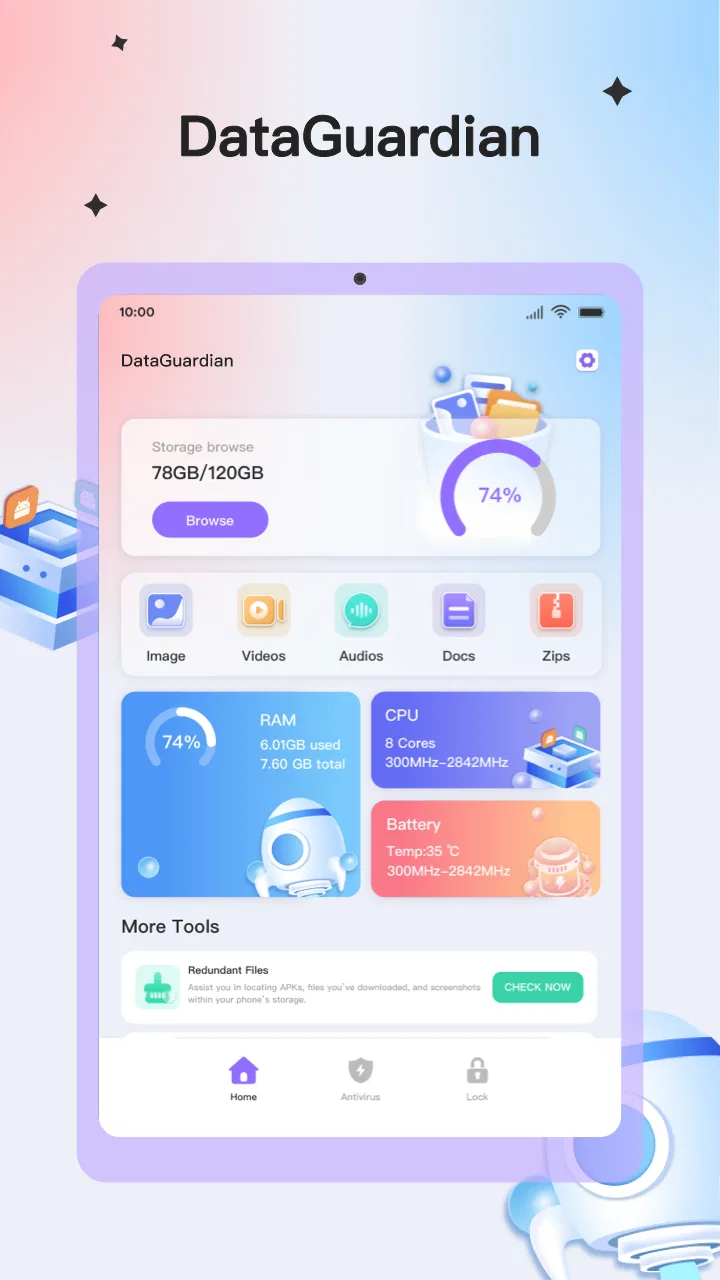
When I first opened DataGuardian - Antivirus, I treated it less like a dramatic security rescue tool and more like a practical device-management utility. That distinction matters. The app is aimed at people who want a clearer, more organized way to look after an Android phone, rather than users searching for a complicated security suite with a long list of specialist controls.
It is a free tools app from calculatorteam2024, available for users aged Everyone, and it runs on Android 6.0 or later. The current release is version 1.0.15. Its straightforward positioning makes it approachable for a first-time user, especially someone who wants to begin with a simple check instead of spending time learning a large security dashboard.
My overall impression is positive but measured. The app feels most useful when I use it as part of a regular phone-care routine: open it, inspect what it offers, perform a sensible check, and then decide whether anything needs attention. The best way to use it is as a convenient first layer of device management, not as a reason to ignore Android updates, careful downloads, or normal privacy habits.
You May Also Like

 Blood Strike: 2.5 Anniversary
Blood Strike’s Loadouts Turn Every Drop Into a Tactical Gamble
A close look at Blood Strike’s custom loadouts: how fast access to signature weapons reshapes its battle royale rhythm, rewards preparation, and narrows the gap between fights.

 Pandora - Music & Podcasts
Pandora’s Music Is Easy to Start, but Harder to Recover
Pandora’s strength is its low-effort path from a seed to a station. Its weak spot is how much confidence it asks you to place in connection, setup, and quiet recovery.

 8 Ball Pool
 Is Built on Rivalries, Rematches, and Routine
A close look at the rivalries, rematches, shared routines, and unanswered safety questions that turn a quick pool match into a persistent mobile community.

 Samsung Music
’s Quiet Strength Is Playing What You Already Own
Its reach comes less from spectacle than from dependable access to a personal library. That simplicity is both the app’s strongest retention engine and its ceiling.

 AccuWeather: Weather Radar
AccuWeather Review: A Quick, Clear Forecast for Everyday Decisions
For everyday plans, the best forecast is the one you can understand quickly. AccuWeather makes rain timing, radar, and local conditions easy to act on, with a few trade-offs.

 Hill Climb Racing
Why Hill Climb Racing Still Turns Crashes Into One More Run
A tiny car, a bumpy hill and one more upgrade: Hill Climb Racing keeps resurfacing because its simple chaos makes every near-miss feel personal.
More From Our News Desk



What to expect before you begin
The name naturally sets an expectation of antivirus protection and cleaning, but I would approach the app with a practical mindset. Its store summary describes it as a convenient device management tool, so the value is in bringing everyday maintenance into one accessible place. That can be useful if you dislike jumping between system menus or trying to remember which part of Android handles a particular task.
On the store, the app has an average rating of 4.6 from around 20 thousand ratings, with more than a million installs. Those figures suggest that it has found an audience, but they should not replace your own judgment about how it fits your phone. Security-related apps are especially dependent on the device, Android version, installed software, and the choices the user makes after seeing a warning.
I would recommend it first to someone who wants a gentle starting point. For example, a family member with an older Android phone may prefer one recognizable app for routine checks rather than a collection of unfamiliar utilities. It can also suit a user who has accumulated apps over time and wants to pause before deleting anything, changing settings, or assuming that every warning requires immediate action.
On the other hand, I would not choose it as the only security measure for a person managing sensitive business information, testing unknown software, or needing detailed threat analysis. In those situations, a well-established security product with clearly documented specialist controls may be a better match. The important trade-off is simplicity: a focused interface is easier to approach, but it may not satisfy someone who wants deep explanations and fine-grained configuration.
How I frame the first session
Before tapping through the app, I make sure I know what I want to accomplish. “Make my phone safer” is too vague to guide a useful session. A better first goal is to inspect the available management tools, run the most relevant check, and understand what the result means before taking action.
This prevents a common mistake with cleaner and antivirus-style apps: treating every suggested action as equally urgent. A recommendation may be useful, but the right response depends on what is being identified, whether I still use it, and whether removing or changing it could affect something important. I keep that decision-making step in my own hands.
Setting it up without rushing
The initial setup is easier when I move slowly and read each screen rather than approving everything automatically. I look at what the app is asking me to do, why that step might be needed, and whether it relates to the task I actually want to perform. This is a good habit with any tool that deals with device management, and it is particularly important when the app uses words such as protection, cleaning, or risk.
I also avoid starting with a large cleanup session while I am busy. A first run is better done when I have time to review results. If the app presents items that can be removed or adjusted, I want enough attention available to recognize something familiar. A forgotten document, an old download, or an app used only occasionally may still be valuable.
One useful preparation step is to note the phone’s current condition. Is storage already tight? Has the device recently behaved strangely? Have I installed several apps that I no longer remember using? Writing down that context, even mentally, makes the results more meaningful. Otherwise, it is easy to confuse a general recommendation with proof that the phone has a serious problem.
Because DataGuardian - Antivirus&Clean is free, the barrier to trying it is low. I still recommend checking the app’s screens carefully instead of assuming that free means effortless or unlimited in every respect. The practical question is whether the actions it offers are understandable and useful on your particular phone.
The first meaningful success
For a first-time user, I would define success as completing one clear inspection and leaving with a better understanding of the phone. That might mean identifying an app I no longer need, noticing a maintenance item worth revisiting, or simply confirming that there is nothing requiring immediate attention. A useful result does not have to involve deleting a large amount of content.
My preferred workflow is deliberately conservative. I open the relevant management area, begin the available check, read the outcome, and separate information from action. If the app points to something familiar and unnecessary, I consider removing it. If the item is unfamiliar, I investigate it before touching anything. This approach turns the app into a decision aid rather than an automatic button I press without looking.
A realistic example is a phone used for photos, messaging, banking, and occasional travel. After returning from a trip, I might have several temporary apps, downloaded files, and tools I installed for a single purpose. DataGuardian - Antivirus&Clean can be useful as a reminder to review that clutter. I would inspect each suggestion, keep anything connected to travel records or receipts, and remove only what I recognize as disposable.
That workflow contains an important, non-obvious benefit: it creates a repeatable maintenance habit. Instead of waiting until the phone feels slow or confusing, I can use a short review session after a busy period. The app becomes most valuable when it helps me notice patterns in my own device use, not when I chase an impressive-looking result.
What the results can and cannot tell you
I pay close attention to the difference between a detected item and a confirmed threat. A device-management app may surface something worth reviewing, but the label alone does not tell me whether the item is malicious, unnecessary, outdated, or simply unfamiliar. I want enough context to make a sensible choice.
This is where human judgment remains essential. If a warning concerns an app I need for work, authentication, accessibility, or communication, I do not remove it just because it appears in a cleanup-oriented screen. I first consider what would stop working. A tidy phone is not automatically a safer phone if important tools are removed without understanding their role.
I also avoid using a cleaner as a substitute for backups. Before making broad changes, I keep important photos, documents, and account information protected through the methods I already trust. That is not a criticism of this particular app; it is simply good practice whenever a tool encourages device maintenance.
Common confusion during everyday use
The first source of confusion is the relationship between antivirus language and general cleaning. These are related ideas, but they are not identical. Antivirus work is about identifying or responding to potentially harmful software, while cleaning usually concerns unnecessary items or device clutter. I read each result according to the action it recommends instead of assuming that every item is dangerous.
A second point is that a cleaner cannot solve every reason a phone feels slow. Storage pressure is only one possible cause. An aging battery, a demanding app, poor network conditions, or a system issue can create similar symptoms. If the phone remains sluggish after a sensible review, I would look at Android’s own settings and the behavior of individual apps rather than repeatedly running the same cleanup.
Another common misunderstanding is expecting one scan to provide permanent protection. Phones change constantly: new apps are installed, permissions evolve, and downloads accumulate. A single successful check is useful, but it is not a lifetime guarantee. I prefer occasional, purposeful reviews over constant anxious scanning.
There is also a difference between convenience and control. DataGuardian - Antivirus&Clean may be more comfortable than searching through several system screens, but Android’s built-in tools can sometimes provide more direct information about storage, battery use, permissions, and app behavior. If I need a precise system setting, I may still go to Android itself. I see the app as a convenient front door, not a replacement for the operating system.
That comparison is important when choosing between this app and usual alternatives. Android’s native tools are already integrated and can be preferable for users who want the fewest additional apps. A dedicated antivirus product may be better for someone who wants a long security history, detailed threat explanations, or a broader set of protective controls. A standalone file manager may be more suitable for a person whose main concern is sorting documents and media manually.
DataGuardian - Antivirus&Clean occupies a middle ground. Its appeal is the chance to approach device care through one accessible tool, without committing to a more complex security package. Its limitation is that users who require extensive technical detail may find that convenience less satisfying than a specialized alternative.
Three habits that make it more useful
- Review before removing: I treat cleanup suggestions as a shortlist, not an instruction. I check whether I recognize the item and whether another app depends on it.
- Use a before-and-after check: If I am trying to solve a storage or usability problem, I note what changed afterward. If nothing improved, I stop repeating the same action and investigate another cause.
- Separate security from housekeeping: I read antivirus-related messages and cleanup suggestions as different kinds of information. That keeps a harmless unused file from feeling like a confirmed infection.
A fourth habit is to use the app at a calm moment rather than during an emergency. If I am already locked out of an account or dealing with suspicious activity, I want a clear incident-response plan, not a rushed tour of a new utility. For routine care, however, the app can help turn vague concern into a manageable checklist.
Who should use it, and who should skip it
I think it is a good fit for first-time users who want a simple place to begin, people who prefer guided device maintenance, and households where an Android phone has gradually collected forgotten apps and files. Its Everyone age rating also makes it approachable for a broad audience, although younger or less experienced users should still have help before removing anything important.
It is less suitable for advanced users who already understand Android’s system tools and want granular technical reporting. I would also look elsewhere if my priority were enterprise security, forensic investigation, or a fully documented suite of specialized defenses. In those cases, a dedicated product is likely to justify its extra complexity.
I would skip it as well if I expected a cleaner to transform an old phone into a new one. Maintenance can reduce clutter and improve organization, but it cannot change hardware limits or fix every performance problem. That expectation is unfair to the app and can lead to unnecessary repeated actions.
My next step after the first check
After completing the first meaningful action, I do not immediately start changing more settings. I review what I learned and decide whether a follow-up is actually needed. If the phone feels organized and the results are clear, I leave it alone. If the app highlights something unfamiliar, I investigate that specific item instead of launching a broad cleanup.
I also keep the app in perspective. It is free, available for Android devices running version 6.0 or later, and developed by calculatorteam2024. Its strong user response and broad install base make it easy to consider, but the right choice still depends on how much control and explanation I expect from a security tool.
My recommendation is simple: try it with one modest goal, read every result, and judge the usefulness of the outcome rather than the drama of the wording. If you want a friendly starting point for routine device management, it is worth exploring. If you need specialist protection, deep diagnostics, or absolute certainty from every scan, compare it with Android’s built-in controls and a more established dedicated security option.
In my experience, DataGuardian - Antivirus works best when it supports good habits instead of replacing them. Used carefully, it can make the first step toward a cleaner, more understandable phone feel reassuring rather than technical. That is a worthwhile role, provided I remain the person making the final decisions about what stays on my device.
FAQs for DataGuardian - Antivirus&Clean
01What features does DataGuardian - Antivirus&Clean offer?
DataGuardian provides comprehensive security features including real-time virus scanning, malware detection, and removal. It also includes tools for cleaning junk files, optimizing device performance, and securing personal data. Additionally, it offers Wi-Fi security checks and privacy protection features to keep your information safe from potential threats.
02Is DataGuardian - Antivirus&Clean free to use?
DataGuardian offers a free version with basic features such as virus scanning and junk file cleaning. However, for advanced features like real-time protection, enhanced privacy controls, and priority updates, users may need to subscribe to the premium version. Pricing details can usually be found within the app itself.
03How does DataGuardian impact device performance and battery life?
DataGuardian is designed to be lightweight and efficient, ensuring minimal impact on device performance. It runs background tasks only when necessary and uses advanced algorithms to optimize battery usage. Users typically report no significant slowdown in device performance or battery drainage, making it ideal for daily use.
04Can DataGuardian protect my device from online threats?
Yes, DataGuardian includes features that protect against online threats such as phishing attacks and unsafe websites. It actively monitors browsing activity and blocks malicious links to prevent unauthorized access to your data. This makes it a reliable tool for secure browsing and online transactions.
05Is DataGuardian compatible with all Android and iOS devices?
DataGuardian is compatible with most Android and iOS devices, with requirements typically listed on the app's download page. It supports a wide range of OS versions, but for optimal performance, it's recommended to use it on devices with the latest operating system updates. Check the app store for specific compatibility details.
Pros
- Lightweight and efficient performance.
- User-friendly interface for easy navigation.
- Regular updates to ensure security.
- Minimal impact on battery life.
- Comprehensive scanning options.
Cons
- Occasional false positives in scans.
- Limited customer support availability.
- Premium features require subscription.
- Some ads in the free version.
- Limited compatibility with older devices.

DataGuardian - Antivirus&Clean
Gallery